
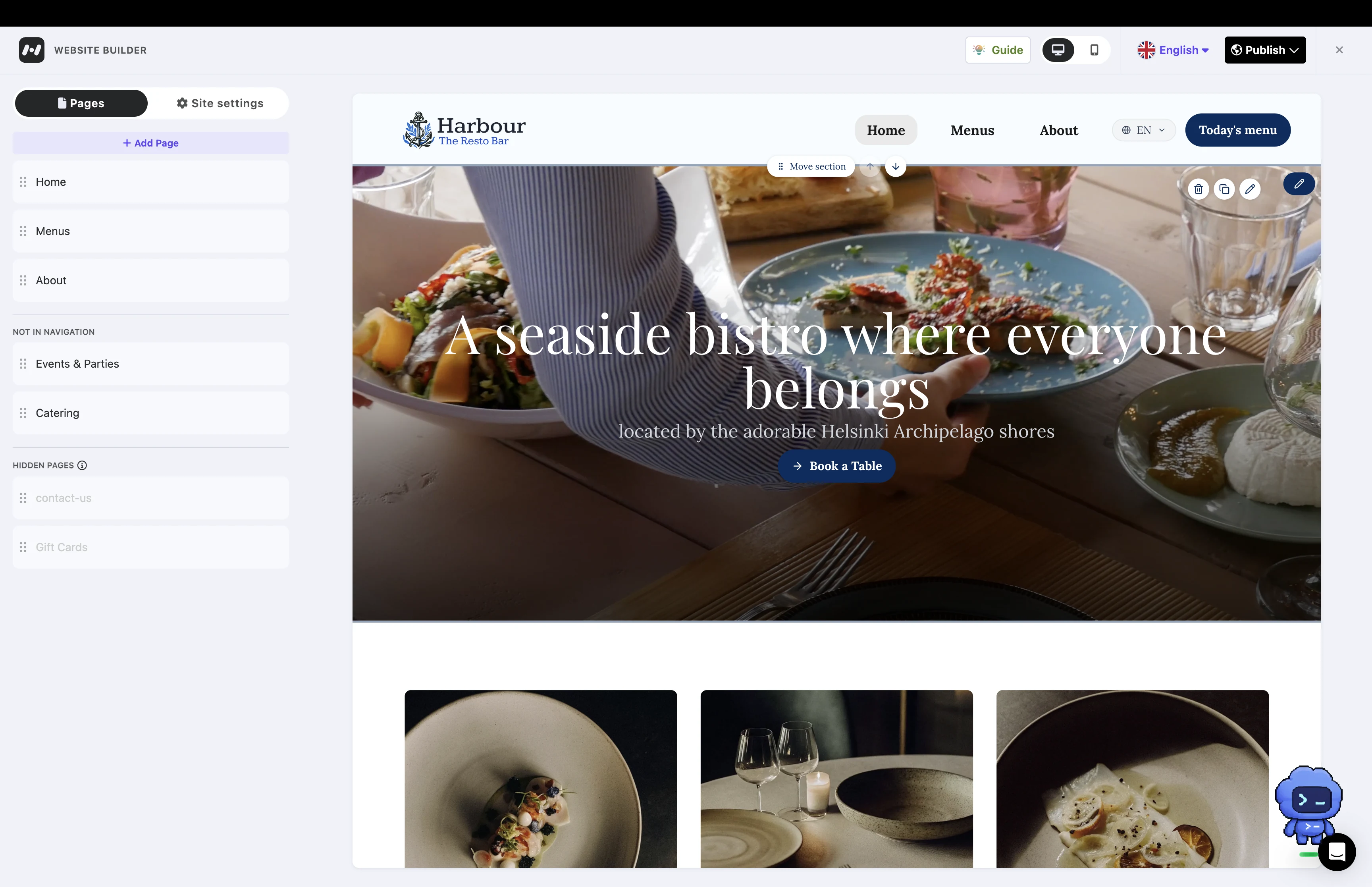
From customer research to a shipped website builder
We trialled the website builder with approximately 25 restaurants, then launched it more broadly.1
Restaurant owners depended on agencies for small changes. I connected the website to business information they already maintained in Mobal, designed visual editing controls and worked through multilingual publication.
Project snapshot
Problem
Restaurant owners depended on agencies or friends for small website changes, or struggled to find time to maintain the site themselves.
Solution
A website builder connected to Mobal’s business information, with populated content, visual editing and multilingual publication.
Impact
A trial with approximately 25 restaurants followed by a broader launch.
- Role
- Lead Designer · Product direction, research, interaction and visual design
- Duration
- Approximately three to four months of end-to-end design
- Partners
- Founders, product, engineering, Sales and Customer Success
- Delivery
- Website builder shipped · Ordering outside general availability
Part of Mobal’s evolution from an agency-built tool into self-service software. Back to the Mobal platform case →.
01 / Keeping a website current was the harder job
Restaurant owners told me that small website changes meant contacting an agency or friend, waiting and following up. Owners who could edit their sites themselves still struggled to find time.
I found this through conversations with restaurant owners and newly opened cafés. We developed the direction with restaurants in Finland and Sweden, including larger chains, and gathered feedback as the work progressed.
Much of the information they needed to maintain already belonged in Mobal. I proposed connecting restaurant websites to that business information so owners would not need to repeat updates across separate tools. We prioritised menus before the website experience, establishing the content the site would use.
Reuse business information across the experience
Maintain information in Mobal
Menus, business hours, location details and other profile content.
Choose what appears on the website
Select menus and posts, and combine them with website-specific content.
Keep connected information current
The website uses the information maintained in Mobal alongside connected listings.
My responsibility
I worked with the founders and leadership on the product direction, then owned research, interaction and visual design, prototyping and implementation reviews. I worked largely as the sole designer, with occasional design support.
Customer feedback was part of our planning. I had proposed a weekly support rotation and helped steer it with Customer Success. Interaction summaries fed a shared Notion database for feature and UX triage. That practice later evolved toward AI-assisted support and a dedicated support role.
02 / Start with information the restaurant already has
Owners chose a website direction and initial customisation options, then reviewed a populated site. The homepage combined business information, calls to action, menu highlights and supporting content. Additional pages supported menus, the restaurant’s story, gift cards, catering and contact information.
Engineering’s backend crawler retrieved content from an existing restaurant website and used it to populate initial blocks. My work focused on the experience owners used to review, customise and publish that content.
The editor let owners select existing menus and posts rather than recreate them. Connected information supplied the content; owners still controlled what appeared and how sections looked.
03 / Give restaurants useful choices
The initial proposal favoured a single website template. Customer feedback showed needs that one layout would struggle to accommodate.
A Swedish pizza chain wanted to promote its mobile app. I explored header options, promotional elements and their behaviour across screen sizes. This gave us a concrete reason to support customisation.
I began with font-pair presets to give owners starting points. The current editor also exposes individual heading and body typeface choices. Customer requests for brand colours exposed contrast problems, which I worked through with automatic contrast behaviour and testing across devices.
Brand choices with a visible result
Colour choices, a font-pair preset and individual typeface selectors
Current editor: colour controls, font-pair presets and individual heading and body typeface selectors.
04 / Bring editing into one place
The first editor split controls across both sides of the preview. Page navigation sat on the left, with additional settings on the right. When we shared it with customers, maintaining focus became a problem.
I consolidated pages, sections and their settings into the left sidebar. Language and translation controls followed the same structure, giving owners a consistent place to work.
Some customers preferred rearranging sections through the sidebar. Others wanted to work directly on the canvas. I retained both approaches. Image sections also needed to accommodate different amounts of content and alternative layouts.
Page structure and section controls in one sidebar
Edit a section beside its selected position on the canvas
Layout and content controls sit on the left. The selected section is outlined in the preview, with movement and editing controls available on the canvas.
Manage page details separately from section content
Page settings contain the title, navigation label, URL details, metadata and visibility. Section editing remains a separate tab in the same sidebar.
05 / Make translation status explicit
Editing the primary language could leave other language versions incomplete. Technical constraints meant the first release could not translate every change immediately.
I designed an explicit untranslated-content state. Owners could see that a language needed translation and initiate it from the editor. With auto-translation on publication enabled, the publication flow handled missing translations for the selected languages.
Language selection and explicit translation status
Select additional languages for the website
Add languages from site settings without leaving the editor.
Inspect translation status and automatic translation on publication
Owners can check whether a translation is up to date and choose automatic translation on publication.
The next iteration starts translation automatically as owners make changes. This improvement is work underway.
06 / Review the implementation and follow the rollout
Before launch, I held weekly implementation reviews. We checked responsive breakpoints, transitions, editing behaviour and how sections adapted to different content.
We began the trial with approximately 25 restaurants. Some customers tested a website with one location before extending it to others. In the cases I observed, publication took around two to three weeks. Concerns about replacing an existing website were part of that decision. This timing is an observation, not a measured activation benchmark.
Owners could review different device sizes, publish to a Mobal subdomain and connect their existing domain. Simple website updates also became available through the WhatsApp agent.
The website builder progressed to a broader launch. Post-launch adoption figures are confidential. Maintenance-time savings were not measured.
Delivery boundaries
Image generation and additional AI-specific capabilities had not shipped at the point described. Online ordering remained outside general availability while payment and delivery partnerships progressed. Mobal’s own table-booking experience was in development. A booking button or integration is separate from that native workflow. Agent-assisted page rearrangement remained a future direction.
View Mobal’s restaurant website product.
Footnotes
-
The trial size is approximate. Broader launch describes delivery, not measured adoption or product-market fit. Post-launch adoption figures remain confidential and maintenance-time savings were not measured; delivery boundaries follow below. ↩